
Vagrant + Junos
Vagrant + Junos
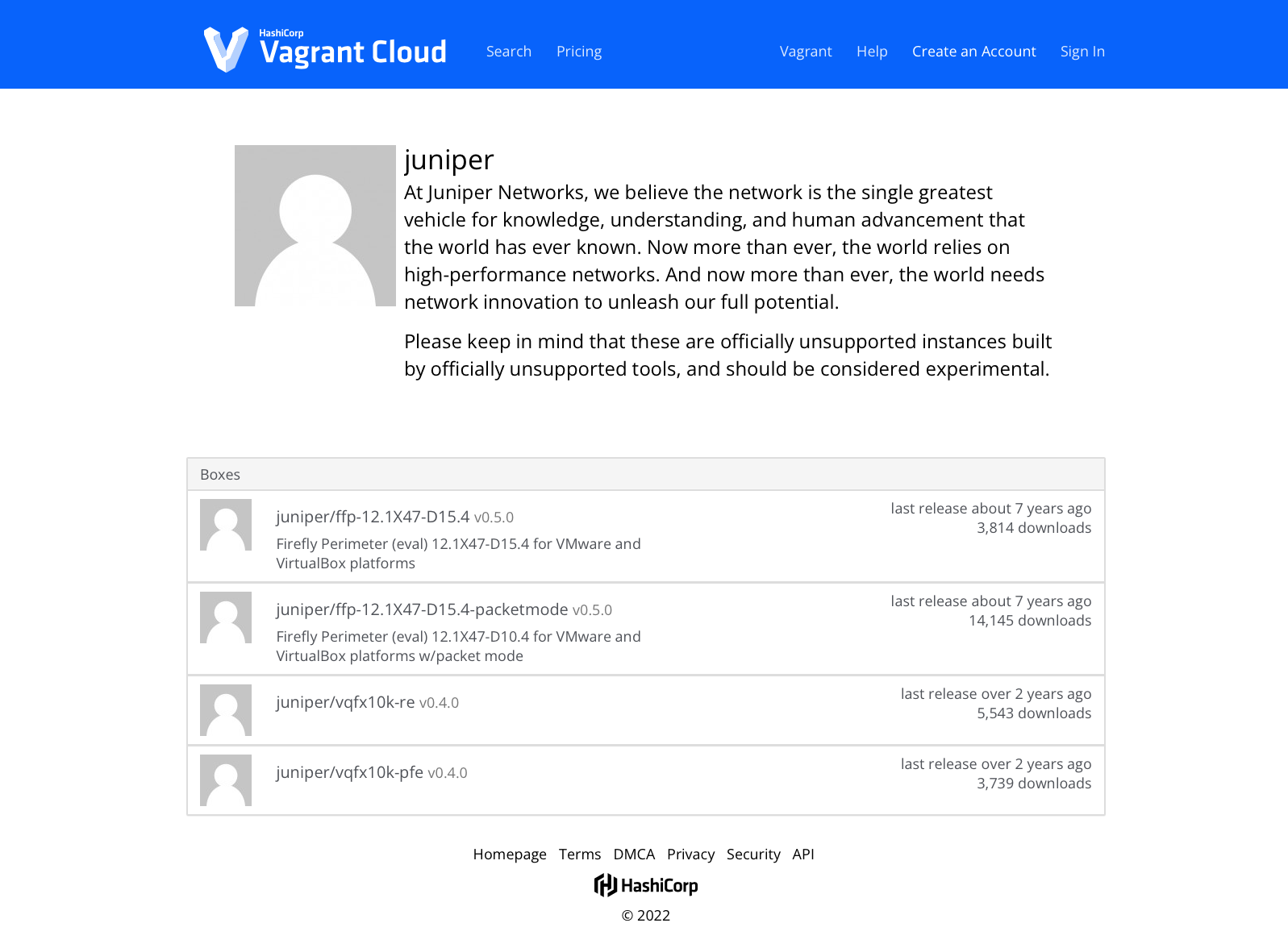
Few years ago, Juniper made available some of its products as Vagrant boxes, which can be found here.
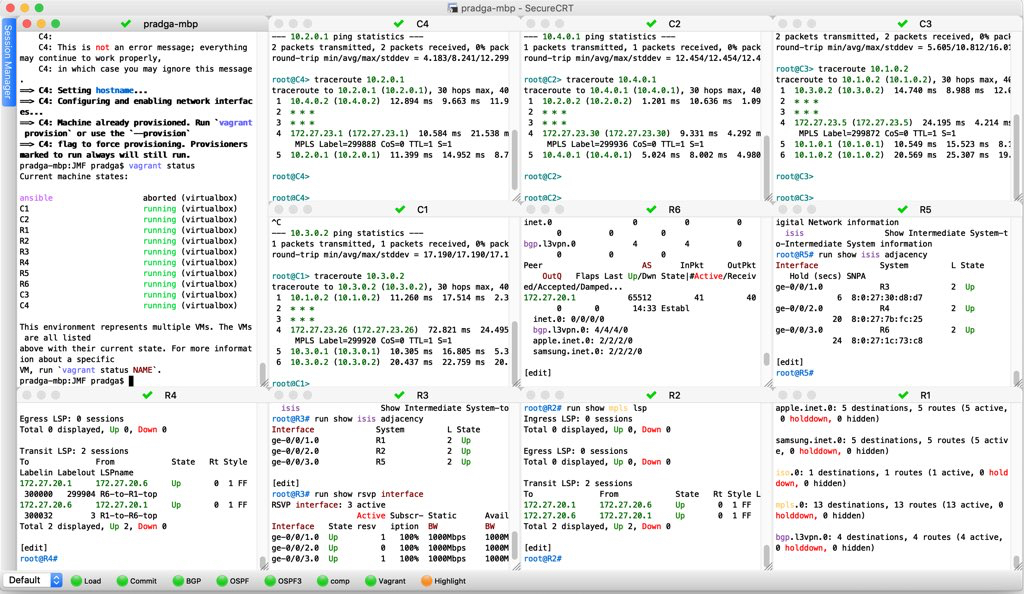
I have used it extensively for my lab practice in the past. Here is a screenshot of my lab with 10 vSRX devices running inside my laptop.
Let us make use of this box to setup a simple lab and practice Junos.
This demo consists of two VMs connected by a link.
pradeep:~$cat Vagrantfile
Vagrant.configure(2) do |config|
  config.vm.box = "juniper/ffp-12.1X47-D15.4-packetmode"

  config.vm.provider "virtualbox" do |vb|
    vb.memory = 512
    vb.cpus = 2
    vb.gui = false
  end

  config.vm.define "srx1" do |srx1|
    srx1.vm.host_name = "srx1"
    srx1.vm.network "private_network",
                     ip: "192.168.1.1",
                     virtualbox__intnet: "srx1-2"
  end

  config.vm.define "srx2" do |srx2|
    srx2.vm.host_name = "srx2"
    srx2.vm.network "private_network",
                     ip: "192.168.1.2",
                     virtualbox__intnet: "srx1-2"
  end
end
pradeep:~$
pradeep:~$vagrant up
Bringing machine 'srx1' up with 'virtualbox' provider...
Bringing machine 'srx2' up with 'virtualbox' provider...
==> srx1: You assigned a static IP ending in ".1" to this machine.
==> srx1: This is very often used by the router and can cause the
==> srx1: network to not work properly. If the network doesn't work
==> srx1: properly, try changing this IP.
==> srx1: Importing base box 'juniper/ffp-12.1X47-D15.4-packetmode'...
==> srx1: Matching MAC address for NAT networking...
==> srx1: You assigned a static IP ending in ".1" to this machine.
==> srx1: This is very often used by the router and can cause the
==> srx1: network to not work properly. If the network doesn't work
==> srx1: properly, try changing this IP.
==> srx1: Checking if box 'juniper/ffp-12.1X47-D15.4-packetmode' version '0.5.0' is up to date...
==> srx1: Setting the name of the VM: learn-vagrant_srx1_1651731306797_85006
==> srx1: Fixed port collision for 22 => 2222. Now on port 2200.
==> srx1: Clearing any previously set network interfaces...
==> srx1: Preparing network interfaces based on configuration...
    srx1: Adapter 1: nat
    srx1: Adapter 2: intnet
==> srx1: Forwarding ports...
    srx1: 22 (guest) => 2200 (host) (adapter 1)
==> srx1: Running 'pre-boot' VM customizations...
==> srx1: Booting VM...
==> srx1: Waiting for machine to boot. This may take a few minutes...
    srx1: SSH address: 127.0.0.1:2200
    srx1: SSH username: root
    srx1: SSH auth method: private key
    srx1:
    srx1: Vagrant insecure key detected. Vagrant will automatically replace
    srx1: this with a newly generated keypair for better security.
    srx1:
    srx1: Inserting generated public key within guest...
    srx1: Removing insecure key from the guest if it's present...
    srx1: Key inserted! Disconnecting and reconnecting using new SSH key...
==> srx1: Machine booted and ready!
==> srx1: Checking for guest additions in VM...
    srx1: No guest additions were detected on the base box for this VM! Guest
    srx1: additions are required for forwarded ports, shared folders, host only
    srx1: networking, and more. If SSH fails on this machine, please install
    srx1: the guest additions and repackage the box to continue.
    srx1:
    srx1: This is not an error message; everything may continue to work properly,
    srx1: in which case you may ignore this message.
==> srx1: Setting hostname...
==> srx1: Configuring and enabling network interfaces...
==> srx2: Importing base box 'juniper/ffp-12.1X47-D15.4-packetmode'...
==> srx2: Matching MAC address for NAT networking...
==> srx2: Checking if box 'juniper/ffp-12.1X47-D15.4-packetmode' version '0.5.0' is up to date...
==> srx2: Setting the name of the VM: learn-vagrant_srx2_1651731430732_54822
==> srx2: Fixed port collision for 22 => 2222. Now on port 2201.
==> srx2: Clearing any previously set network interfaces...
==> srx2: Preparing network interfaces based on configuration...
    srx2: Adapter 1: nat
    srx2: Adapter 2: intnet
==> srx2: Forwarding ports...
    srx2: 22 (guest) => 2201 (host) (adapter 1)
==> srx2: Running 'pre-boot' VM customizations...
==> srx2: Booting VM...
==> srx2: Waiting for machine to boot. This may take a few minutes...
    srx2: SSH address: 127.0.0.1:2201
    srx2: SSH username: root
    srx2: SSH auth method: private key
    srx2:
    srx2: Vagrant insecure key detected. Vagrant will automatically replace
    srx2: this with a newly generated keypair for better security.
    srx2:
    srx2: Inserting generated public key within guest...
    srx2: Removing insecure key from the guest if it's present...
    srx2: Key inserted! Disconnecting and reconnecting using new SSH key...
==> srx2: Machine booted and ready!
==> srx2: Checking for guest additions in VM...
    srx2: No guest additions were detected on the base box for this VM! Guest
    srx2: additions are required for forwarded ports, shared folders, host only
    srx2: networking, and more. If SSH fails on this machine, please install
    srx2: the guest additions and repackage the box to continue.
    srx2:
    srx2: This is not an error message; everything may continue to work properly,
    srx2: in which case you may ignore this message.
==> srx2: Setting hostname...
==> srx2: Configuring and enabling network interfaces...
pradeep:~$
pradeep:~$vagrant status
Current machine states:

srx1                      running (virtualbox)
srx2                      running (virtualbox)

This environment represents multiple VMs. The VMs are all listed
above with their current state. For more information about a specific
VM, run `vagrant status NAME`.
pradeep:~$
SSH to srx1
pradeep:~$vagrant ssh srx1
--- JUNOS 12.1X47-D15.4 built 2014-11-12 02:13:59 UTC
root@srx1%
root@srx1% cli
root@srx1>
Display current active configuration
root@srx1> show configuration
## Last commit: 2022-05-05 06:17:02 UTC by root
version 12.1X47-D15.4;
system {
    host-name srx1;
    root-authentication {
        encrypted-password "$1$nq.N1UsY$JxA/ESAj3KuXseXE597gg0"; ## SECRET-DATA
        ssh-rsa "ssh-rsa AAAAB3NzaC1yc2EAAAADAQABAAABAQDS8VmjJwq5I7swH3/Uh6UIecpz4AXF3WGMWTZQUP2TpKxA6cRfMbjnS3WgMpsjWwiM67n5/5ONfeLRwMerFyLTEPRZZhUOpk7PRInUHXOQ9n25eeOwxXA2RyD5FHmlmBnr1zf38Yq2Za+zR0PmY2k7KBb4EILfAeOcJnIj4IurQWJvf0mt1dQzqkRj6nT7c3q5849NUlL+S2sDjCBI/0UqZbX1dic1i1IwXALuvNz2ZWhROQRzQf21+ZiwKFqfI3A5asMrTZDI7Cfy9VNrK4BeCJOAcZJHGTgleusYZGnq05ZQQY0U/htw3FQ2Rkj+nKgAGSza6/2Mi6mBuIyzk/0P vagrant"; ## SECRET-DATA
    }
    login {
        user vagrant {
            uid 2000;
            class super-user;
            authentication {
                ssh-rsa "ssh-rsa AAAAB3NzaC1yc2EAAAABIwAAAQEA6NF8iallvQVp22WDkTkyrtvp9eWW6A8YVr+kz4TjGYe7gHzIw+niNltGEFHzD8+v1I2YJ6oXevct1YeS0o9HZyN1Q9qgCgzUFtdOKLv6IedplqoPkcmF0aYet2PkEDo3MlTBckFXPITAMzF8dJSIFo9D8HfdOV0IAdx4O7PtixWKn5y2hMNG0zQPyUecp4pzC6kivAIhyfHilFR61RGL+GPXQ2MWZWFYbAGjyiYJnAmCP3NOTd0jMZEnDkbUvxhMmBYSdETk1rRgm+R4LOzFUGaHqHDLKLX+FIPKcF96hrucXzcWyLbIbEgE98OHlnVYCzRdK8jlqm8tehUc9c9WhQ== vagrant insecure public key"; ## SECRET-DATA
            }
        }
    }
    services {
        ssh {
            root-login allow;
        }
        netconf {
            ssh;
        }
        web-management {
            http {
                interface ge-0/0/0.0;
            }
        }
    }
    syslog {
        user * {
            any emergency;
        }
        file messages {
            any any;
            authorization info;
        }
        file interactive-commands {
            interactive-commands any;
        }
    }
    license {
        autoupdate {
            url https://ae1.juniper.net/junos/key_retrieval;
        }
    }
}
interfaces {
    ge-0/0/0 {
        unit 0 {
            family inet {
                dhcp;
            }
        }
    }
    ge-0/0/1 {
        unit 0 {
            family inet {
                address 192.168.1.1/24;
            }
        }
    }
}
security {
    forwarding-options {
        family {
            inet6 {
                mode packet-based;
            }
            mpls {
                mode packet-based;
            }
        }
    }
}

root@srx1>
Display current active configuration in set format
root@srx1> show configuration | display set
set version 12.1X47-D15.4
set system host-name srx1
set system root-authentication encrypted-password "$1$nq.N1UsY$JxA/ESAj3KuXseXE597gg0"
set system root-authentication ssh-rsa "ssh-rsa AAAAB3NzaC1yc2EAAAADAQABAAABAQDS8VmjJwq5I7swH3/Uh6UIecpz4AXF3WGMWTZQUP2TpKxA6cRfMbjnS3WgMpsjWwiM67n5/5ONfeLRwMerFyLTEPRZZhUOpk7PRInUHXOQ9n25eeOwxXA2RyD5FHmlmBnr1zf38Yq2Za+zR0PmY2k7KBb4EILfAeOcJnIj4IurQWJvf0mt1dQzqkRj6nT7c3q5849NUlL+S2sDjCBI/0UqZbX1dic1i1IwXALuvNz2ZWhROQRzQf21+ZiwKFqfI3A5asMrTZDI7Cfy9VNrK4BeCJOAcZJHGTgleusYZGnq05ZQQY0U/htw3FQ2Rkj+nKgAGSza6/2Mi6mBuIyzk/0P vagrant"
set system login user vagrant uid 2000
set system login user vagrant class super-user
set system login user vagrant authentication ssh-rsa "ssh-rsa AAAAB3NzaC1yc2EAAAABIwAAAQEA6NF8iallvQVp22WDkTkyrtvp9eWW6A8YVr+kz4TjGYe7gHzIw+niNltGEFHzD8+v1I2YJ6oXevct1YeS0o9HZyN1Q9qgCgzUFtdOKLv6IedplqoPkcmF0aYet2PkEDo3MlTBckFXPITAMzF8dJSIFo9D8HfdOV0IAdx4O7PtixWKn5y2hMNG0zQPyUecp4pzC6kivAIhyfHilFR61RGL+GPXQ2MWZWFYbAGjyiYJnAmCP3NOTd0jMZEnDkbUvxhMmBYSdETk1rRgm+R4LOzFUGaHqHDLKLX+FIPKcF96hrucXzcWyLbIbEgE98OHlnVYCzRdK8jlqm8tehUc9c9WhQ== vagrant insecure public key"
set system services ssh root-login allow
set system services netconf ssh
set system services web-management http interface ge-0/0/0.0
set system syslog user * any emergency
set system syslog file messages any any
set system syslog file messages authorization info
set system syslog file interactive-commands interactive-commands any
set system license autoupdate url https://ae1.juniper.net/junos/key_retrieval
set interfaces ge-0/0/0 unit 0 family inet dhcp
set interfaces ge-0/0/1 unit 0 family inet address 192.168.1.1/24
set security forwarding-options family inet6 mode packet-based
set security forwarding-options family mpls mode packet-based

root@srx1>
Display current routing table of srx1
root@srx1> show route

inet.0: 5 destinations, 5 routes (5 active, 0 holddown, 0 hidden)
+ = Active Route, - = Last Active, * = Both

0.0.0.0/0          *[Access-internal/12] 00:04:56
                    > to 10.0.2.2 via ge-0/0/0.0
10.0.2.0/24        *[Direct/0] 00:04:56
                    > via ge-0/0/0.0
10.0.2.15/32       *[Local/0] 00:04:56
                      Local via ge-0/0/0.0
192.168.1.0/24     *[Direct/0] 00:04:16
                    > via ge-0/0/1.0
192.168.1.1/32     *[Local/0] 00:04:16
                      Local via ge-0/0/1.0

root@srx1>
Exit out of srx1 and login to srx2
root@srx1% exit
logout
Connection to 127.0.0.1 closed.
pradeep:~$vagrant ssh srx2
--- JUNOS 12.1X47-D15.4 built 2014-11-12 02:13:59 UTC
root@srx2% cli
root@srx2>
Display the current configuration of srx2 in set format
root@srx2> show configuration | display set
set version 12.1X47-D15.4
set system host-name srx2
set system root-authentication encrypted-password "$1$nq.N1UsY$JxA/ESAj3KuXseXE597gg0"
set system root-authentication ssh-rsa "ssh-rsa AAAAB3NzaC1yc2EAAAADAQABAAABAQCx/b9gIo93Eq7QlmhCQsz/IS2aNpZwZcQKO1IDJinaUcFgfQtGLuvNgMVoqp8wql0CYD+xao+OU+NXPGQoeF4b0xxfvvLCroyYb59w1IundHqU3u3SsWTSxw5P4kmc8yT3zLdsT6AH71hTUEa0UxRMWTnyVS9ONMuOKhIXKp5vr2gN/BPd/bdwj7L1cFp0Sc1oY5IALUHH00Gg4DV+rxDlcDhKLfoz9Js5ewsqDyRo/2s0E7YzOi4SlERBFyaznZ8MtVBN3rUuVj7KRi4oKijD7l+R20NInMN9lpY5j6I4z1ArW5++S9fllwznLIer7IqLc6fhicuJmgcRIwh2wSCL vagrant"
set system login user vagrant uid 2000
set system login user vagrant class super-user
set system login user vagrant authentication ssh-rsa "ssh-rsa AAAAB3NzaC1yc2EAAAABIwAAAQEA6NF8iallvQVp22WDkTkyrtvp9eWW6A8YVr+kz4TjGYe7gHzIw+niNltGEFHzD8+v1I2YJ6oXevct1YeS0o9HZyN1Q9qgCgzUFtdOKLv6IedplqoPkcmF0aYet2PkEDo3MlTBckFXPITAMzF8dJSIFo9D8HfdOV0IAdx4O7PtixWKn5y2hMNG0zQPyUecp4pzC6kivAIhyfHilFR61RGL+GPXQ2MWZWFYbAGjyiYJnAmCP3NOTd0jMZEnDkbUvxhMmBYSdETk1rRgm+R4LOzFUGaHqHDLKLX+FIPKcF96hrucXzcWyLbIbEgE98OHlnVYCzRdK8jlqm8tehUc9c9WhQ== vagrant insecure public key"
set system services ssh root-login allow
set system services netconf ssh
set system services web-management http interface ge-0/0/0.0
set system syslog user * any emergency
set system syslog file messages any any
set system syslog file messages authorization info
set system syslog file interactive-commands interactive-commands any
set system license autoupdate url https://ae1.juniper.net/junos/key_retrieval
set interfaces ge-0/0/0 unit 0 family inet dhcp
set interfaces ge-0/0/1 unit 0 family inet address 192.168.1.2/24
set security forwarding-options family inet6 mode packet-based
set security forwarding-options family mpls mode packet-based

root@srx2>
root@srx2> show route

inet.0: 5 destinations, 5 routes (5 active, 0 holddown, 0 hidden)
+ = Active Route, - = Last Active, * = Both

0.0.0.0/0          *[Access-internal/12] 00:04:10
                    > to 10.0.2.2 via ge-0/0/0.0
10.0.2.0/24        *[Direct/0] 00:04:10
                    > via ge-0/0/0.0
10.0.2.15/32       *[Local/0] 00:04:10
                      Local via ge-0/0/0.0
192.168.1.0/24     *[Direct/0] 00:03:29
                    > via ge-0/0/1.0
192.168.1.2/32     *[Local/0] 00:03:29
                      Local via ge-0/0/1.0

root@srx2>
Verify connectivity from srx2 to srx1.
root@srx2> ping 192.168.1.1
PING 192.168.1.1 (192.168.1.1): 56 data bytes
64 bytes from 192.168.1.1: icmp_seq=0 ttl=64 time=52.851 ms
64 bytes from 192.168.1.1: icmp_seq=1 ttl=64 time=1.304 ms
64 bytes from 192.168.1.1: icmp_seq=2 ttl=64 time=1.787 ms
^C
--- 192.168.1.1 ping statistics ---
3 packets transmitted, 3 packets received, 0% packet loss
round-trip min/avg/max/stddev = 1.304/18.647/52.851/24.186 ms

root@srx2>
Now that we have verified connectivity, let us enable BGP between these two Junos devices.
root@srx2> configure
Entering configuration mode

[edit]
root@srx2# set routing-options autonomous-system 65001

[edit]
root@srx2# set protocols bgp group demo neighbor 192.168.1.1

[edit]
root@srx2# set protocols bgp group demo type internal

[edit]
root@srx2# commit
commit complete
[edit]
root@srx2# exit
Exiting configuration mode

root@srx2> exit

root@srx2% exit
logout
Connection to 127.0.0.1 closed.
pradeep:~$vagrant ssh srx1
--- JUNOS 12.1X47-D15.4 built 2014-11-12 02:13:59 UTC
root@srx1% cli
root@srx1>
Configure srx1 with similar BGP configuration
root@srx1> configure
Entering configuration mode

[edit]
root@srx1# set routing-options autonomous-system 65001

[edit]
root@srx1# set protocols bgp group demo type internal

[edit]
root@srx1# set protocols bgp group demo neighbor 192.168.1.2

[edit]
root@srx1# show | compare
[edit]
+  routing-options {
+      autonomous-system 65001;
+  }
+  protocols {
+      bgp {
+          group demo {
+              type internal;
+              neighbor 192.168.1.2;
+          }
+      }
+  }

[edit]
root@srx1# commit and-quit
commit complete
Exiting configuration mode

root@srx1>
Verify BGP summary
root@srx1> show bgp summary
Groups: 1 Peers: 1 Down peers: 0
Table          Tot Paths  Act Paths Suppressed    History Damp State    Pending
inet.0                 0          0          0          0          0          0
Peer                     AS      InPkt     OutPkt    OutQ   Flaps Last Up/Dwn State|#Active/Received/Accepted/Damped...
192.168.1.2           65001          2          3       0       0           3 0/0/0/0              0/0/0/0
Verify BGP neighbor details
root@srx1> show bgp neighbor
Peer: 192.168.1.2+179 AS 65001 Local: 192.168.1.1+57658 AS 65001
  Type: Internal    State: Established    Flags: <ImportEval Sync>
  Last State: OpenConfirm   Last Event: RecvKeepAlive
  Last Error: None
  Options: <Preference Refresh>
  Holdtime: 90 Preference: 170
  Number of flaps: 0
  Peer ID: 10.0.2.15       Local ID: 10.0.2.15         Active Holdtime: 90
  Keepalive Interval: 30         Peer index: 0
  BFD: disabled, down
  NLRI for restart configured on peer: inet-unicast
  NLRI advertised by peer: inet-unicast
  NLRI for this session: inet-unicast
  Peer supports Refresh capability (2)
  Stale routes from peer are kept for: 300
  Peer does not support Restarter functionality
  NLRI that restart is negotiated for: inet-unicast
  NLRI of received end-of-rib markers: inet-unicast
  NLRI of all end-of-rib markers sent: inet-unicast
  Peer supports 4 byte AS extension (peer-as 65001)
  Peer does not support Addpath
  Table inet.0 Bit: 10000
    RIB State: BGP restart is complete
    Send state: in sync
    Active prefixes:              0
    Received prefixes:            0
    Accepted prefixes:            0
    Suppressed due to damping:    0
    Advertised prefixes:          0
  Last traffic (seconds): Received 5    Sent 5    Checked 6
  Input messages:  Total 2      Updates 1       Refreshes 0     Octets 42
  Output messages: Total 3      Updates 0       Refreshes 0     Octets 120
  Output Queue[0]: 0

root@srx1>
Monitor BGP traffic
root@srx1> monitor traffic interface ge-0/0/1.0
verbose output suppressed, use <detail> or <extensive> for full protocol decode
Address resolution is ON. Use <no-resolve> to avoid any reverse lookup delay.
Address resolution timeout is 4s.
Listening on ge-0/0/1.0, capture size 96 bytes

Reverse lookup for 192.168.1.1 failed (check DNS reachability).
Other reverse lookup failures will not be reported.
Use <no-resolve> to avoid reverse lookups on IP addresses.

06:29:58.093750  In IP 192.168.1.2.bgp > 192.168.1.1.57658: P 2275298730:2275298749(19) ack 1084032692 win 16384 <nop,nop,timestamp 74913 84917>: BGP, length: 19
06:29:58.190942 Out IP 192.168.1.1.57658 > 192.168.1.2.bgp: . ack 19 win 17180 <nop,nop,timestamp 87423 74913>
06:29:59.001069 Out IP truncated-ip - 11 bytes missing! 192.168.1.1.57658 > 192.168.1.2.bgp: P 1:20(19) ack 19 win 17180 <nop,nop,timestamp 87504 74913>: BGP, length: 19
06:29:59.103573  In IP 192.168.1.2.bgp > 192.168.1.1.57658: . ack 20 win 16384 <nop,nop,timestamp 75015 87504>
06:30:23.261040 Out IP truncated-ip - 11 bytes missing! 192.168.1.1.57658 > 192.168.1.2.bgp: P 20:39(19) ack 19 win 17180 <nop,nop,timestamp 89930 75015>: BGP, length: 19
06:30:23.354050  In IP 192.168.1.2.bgp > 192.168.1.1.57658: . ack 39 win 16384 <nop,nop,timestamp 77440 89930>
06:30:24.743304  In IP 192.168.1.2.bgp > 192.168.1.1.57658: P 19:38(19) ack 39 win 16384 <nop,nop,timestamp 77578 89930>: BGP, length: 19
06:30:24.840384 Out IP 192.168.1.1.57658 > 192.168.1.2.bgp: . ack 38 win 17161 <nop,nop,timestamp 90088 77578>
^C
8 packets received by filter
0 packets dropped by kernel
Let us save our work and supend these VMs for later use.
oot@srx1> exit

root@srx1% exit
logout
Connection to 127.0.0.1 closed.
pradeep:~$vagrant suspend
==> srx1: Saving VM state and suspending execution...
==> srx2: Saving VM state and suspending execution...
pradeep:~$vagrant status
Current machine states:

srx1                      saved (virtualbox)
srx2                      saved (virtualbox)

This environment represents multiple VMs. The VMs are all listed
above with their current state. For more information about a specific
VM, run `vagrant status NAME`.
pradeep:~$
Whenever we are ready again, we can resume the setup.
pradeep:~$vagrant resume
==> srx1: Resuming suspended VM...
==> srx1: Booting VM...
==> srx1: Waiting for machine to boot. This may take a few minutes...
    srx1: SSH address: 127.0.0.1:2200
    srx1: SSH username: root
    srx1: SSH auth method: private key
==> srx1: Machine booted and ready!
==> srx1: Machine already provisioned. Run `vagrant provision` or use the `--provision`
==> srx1: flag to force provisioning. Provisioners marked to run always will still run.
==> srx2: Resuming suspended VM...
==> srx2: Booting VM...
==> srx2: Waiting for machine to boot. This may take a few minutes...
    srx2: SSH address: 127.0.0.1:2201
    srx2: SSH username: root
    srx2: SSH auth method: private key
==> srx2: Machine booted and ready!
==> srx2: Machine already provisioned. Run `vagrant provision` or use the `--provision`
==> srx2: flag to force provisioning. Provisioners marked to run always will still run.
pradeep:~$
==> srx2: flag to force provisioning. Provisioners marked to run always will still run.
pradeep:~$vagrant ssh srx1
--- JUNOS 12.1X47-D15.4 built 2014-11-12 02:13:59 UTC
root@srx1% cli
root@srx1> show bgp summary
Groups: 1 Peers: 1 Down peers: 0
Table          Tot Paths  Act Paths Suppressed    History Damp State    Pending
inet.0                 0          0          0          0          0          0
Peer                     AS      InPkt     OutPkt    OutQ   Flaps Last Up/Dwn State|#Active/Received/Accepted/Damped...
192.168.1.2           65001         13         15       0       0        5:27 0/0/0/0              0/0/0/0

root@srx1> show bgp summary
Groups: 1 Peers: 1 Down peers: 0
Table          Tot Paths  Act Paths Suppressed    History Damp State    Pending
inet.0                 0          0          0          0          0          0
Peer                     AS      InPkt     OutPkt    OutQ   Flaps Last Up/Dwn State|#Active/Received/Accepted/Damped...
192.168.1.2           65001         13         15       0       0        5:32 0/0/0/0              0/0/0/0

root@srx1>
We can see our BGP session is intact!
When we no longer need this setup, we can simply destroy it.
root@srx1> exit

root@srx1% exit
logout
Connection to 127.0.0.1 closed.
pradeep:~$vagrant destroy
    srx2: Are you sure you want to destroy the 'srx2' VM? [y/N] y
==> srx2: Forcing shutdown of VM...
==> srx2: Destroying VM and associated drives...
    srx1: Are you sure you want to destroy the 'srx1' VM? [y/N] y
==> srx1: You assigned a static IP ending in ".1" to this machine.
==> srx1: This is very often used by the router and can cause the
==> srx1: network to not work properly. If the network doesn't work
==> srx1: properly, try changing this IP.
==> srx1: Forcing shutdown of VM...
==> srx1: Destroying VM and associated drives...
pradeep:~$
With this, we have seen how we can practice most of the Junos right out of our laptop itself! Thanks to Vagrant which made the lab setup simpler!!